
If you run a secrets manager, the worst day of your year is the day you find out a token got out. Maybe an engineer pasted a JWT into a Slack DM that ended up in an export. Maybe an agent's credentials got exfiltrated from a misconfigured CI runner. Either way, by the time you notice, the damage is usually already done.
1claw just shipped a Risk Engine built to catch this stuff while it's happening, not after. Here's what it does and why it matters.
What "risk engine" actually means here
Every time a person or an AI agent authenticates to 1claw, the system pauses for a moment and asks: does this look right? It pulls in geo data on the client IP (using MaxMind GeoLite2), runs the request through a chain of detectors, and produces a verdict. Low or medium risk gets a normal JWT issued. High or critical risk gets blocked with a 401 before any token comes out the door.
That's the whole shape of it. The flow looks roughly like this:
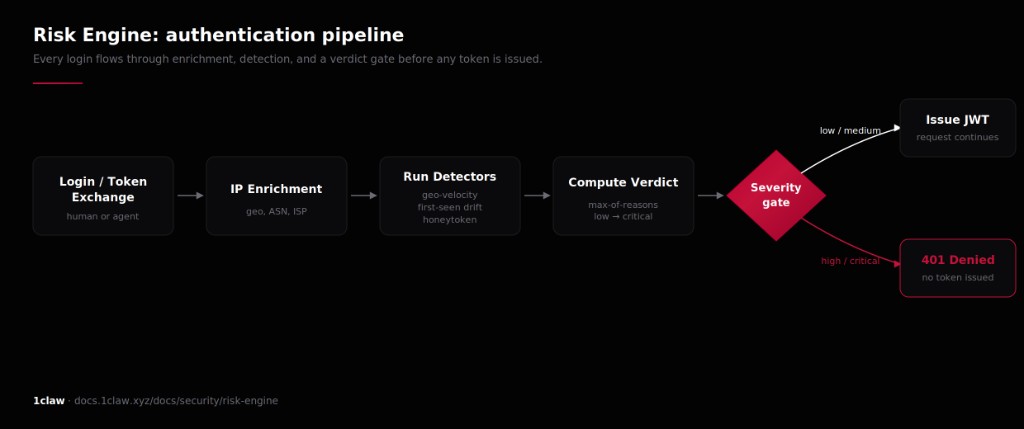
The interesting parts are the detectors.
Impossible travel
The first detector is geo-velocity. If you authenticated from Berlin twenty minutes ago and you're now trying to auth from São Paulo, the system does a Haversine calculation between the two points, divides by elapsed time, and asks whether the implied speed is plausible. Default threshold is 900 km/h, which is roughly the cruising speed of a commercial jet. Anything faster gets flagged.
There's a VPN ASN allowlist, so traveling employees who legitimately bounce around aren't punished for it. But a credential being used from two continents at once is a strong signal that the credential is no longer yours.
First-seen drift
The second detector watches for new patterns. New ASN you've never authenticated from? Medium severity. New country? Medium. New device? Low. Each successful login updates your baseline, so the engine learns who you actually are over time without anyone having to configure anything.
This kind of detection has been standard at big cloud providers for years, but it's been mostly absent from the secrets manager space.
Honeytokens
This is the part I find most interesting. You can mark certain secrets as honeytokens — basically decoys — and place them at paths that look juicy. Things like credentials/aws-root or api-keys/production. A legitimate user has no reason to ever read those, because they aren't real credentials. They're traps.
The moment someone reads one, a critical verdict gets logged. The clever bit is that the current request isn't blocked, because blocking it would tell the attacker they tripped a wire. Instead, the attacker walks away thinking they got something, and their next authentication attempt is the one that gets denied. Meanwhile your team gets paged.
If a honeytoken fires, you don't have a "maybe" on your hands. You have confirmed unauthorized access. That's an incredibly clean signal in a domain where signal-to-noise is usually terrible.
Creating one is a single call. Via the SDK:
import { OneclawClient } from "@1claw/sdk";

const client = new OneclawClient({ apiKey: process.env.ONECLAW_KEY });

await client.risk.createHoneytoken({
  vault_id: "vault_prod_01",
  secret_path: "credentials/aws-root",
  notes: "Canary. Real root creds live in a different vault."
});
Or straight against the API:
curl -X POST https://api.1claw.xyz/v1/risk/honeytokens \
  -H "Authorization: Bearer $TOKEN" \
  -H "Content-Type: application/json" \
  -d '{
        "vault_id": "vault_prod_01",
        "secret_path": "api-keys/production",
        "notes": "Canary for vault breach"
      }'
The path is the only part that matters from an attacker's perspective. Make it look like something they'd grab on a smash-and-grab.
DPoP token binding
This one is more in the weeds, but it matters. DPoP (RFC 9449) binds a JWT to a keypair generated on the client. The public key's thumbprint gets embedded in the token. Every subsequent request has to be accompanied by a fresh signed proof from the matching private key.
What this buys you: stealing the JWT alone is no longer enough. An attacker would need the private key too, and the private key never leaves the client. Turning it on in the SDK is a one-liner:
const client = new OneclawClient({
  apiKey: "ocv_...",
  dpop: true, // bind every issued token to a P-256 keypair
});
For the MCP server or CLI, it's an env var:
export ONECLAW_DPOP=trueFor organizations that want to be strict, admins can set DPoP to required org-wide, and any request without a valid proof gets rejected. Three modes:
| Mode | Behavior |
|---|---|
| off | DPoP not required (default) |
| warn | Log when DPoP is missing, but allow |
| required | Reject requests without valid DPoP proof |
The warnmode is the realistic rollout path. Flip it on, watch the logs for a week to find the clients that haven't been upgraded, then move to required.
Continuous Access Evaluation
Last piece. When the Risk Engine throws a critical verdict, every active token tied to that principal gets invalidated immediately. Bound keys revoked. Agent tokens deleted. JTIs dropped into a revocation list. The next request that comes in with one of those tokens fails.
This is the difference between "we'll log you out at session expiry" (which could be hours away) and "you're out, right now." For a stolen credential scenario, those hours are everything. Verdicts carry a 15 minute TTL by default, so once the situation cools off the principal can re-authenticate cleanly, or an admin can clear the verdict manually from the dashboard.
Querying what happened
The dashboard is fine for spot checks, but if you want to wire this into your own SIEM or on-call tooling, the events and verdicts are exposed via API. List recent high-severity events:
curl "https://api.1claw.xyz/v1/risk/events?severity=high&limit=50" \
  -H "Authorization: Bearer $TOKEN"
Pull the active verdict for a specific principal:
# for a human user
curl https://api.1claw.xyz/v1/risk/verdicts/user/$USER_ID \
  -H "Authorization: Bearer $TOKEN"

# for an agent
curl https://api.1claw.xyz/v1/risk/verdicts/agent/$AGENT_ID \
  -H "Authorization: Bearer $TOKEN"
A pattern that works well: poll the events endpoint every minute from a small worker, push anything high or critical into PagerDuty, and let the rest fall into a Slack channel for triage. Honeytoken hits should always page. Geo-velocity hits are usually worth a look but sometimes resolve to a sales engineer who forgot to flip their VPN back on.
Why this matters for AI agents
1claw's whole pitch is that it handles secrets for both humans and AI agents. Agents are an interesting attack surface because they tend to live longer than human sessions, run in environments you don't always control, and hold credentials with broad scope. A leaked agent token is often worth more to an attacker than a leaked user token.
Layering geo-velocity, first-seen anomaly detection, honeytokens, DPoP binding, and CAE on top of agent authentication closes a bunch of doors that a lot of competing setups still leave wide open. It also runs by default. There's nothing to configure unless you want to, with honeytokens being the obvious exception since those need to be placed manually.
The takeaway
Most secrets managers stop at "we encrypt your stuff and let you rotate it." That's table stakes now. The interesting question is what happens when a credential gets out, because eventually one will. Having an engine that watches for the signature of compromise in real time, and that can yank every active token in milliseconds when it spots one, is the kind of feature that pays for itself the first time it fires.
Full docs are at docs.1claw.xyz/docs/security/risk-engine if you want to dig in.